
Caching Explained: The Complete Guide Every Software Engineer Should Read (Python, Databases, APIs & AI)
Why are companies like Netflix, Google, Amazon, and OpenAI obsessed with caching? Because milliseconds translate into millions of dollars. This is practical guide backed by 8 real Python experiments.

Table of Contents
Why Caching Matters: The Numbers Don’t Lie
What Gets Deleted When the Cache Is Full?
Storing Things in Memory: Your Python Toolbox
Speeding Up Your Database
HTTP Caching: Let the Web Do the Work
When You Write Data: Three Different Approaches
Smarter Caching for AI Chatbots
The Big Picture: How Everything Fits Together
Here is something that happens in nearly every software team, sooner or later. Your app works fine in testing. You launch it. Traffic grows. Then one day, someone opens a dashboard and it takes seven seconds to load. The database server is sweating. The on-call engineer is awake at 2 AM. The fix, almost always, is caching.
Github link for the code in this experiment, you can download the files and run in your local to test yourself: link
Caching means: instead of doing the same expensive work over and over, save the result the first time and reuse it. That’s the whole idea. A user loads a product page, you fetch the product from the database, you save a copy in memory. The next user who loads that same page gets the copy instantly, no database needed.
But caching is full of decisions. When does the saved copy expire? What happens when you update the product price? What if you have 10 million products but only enough memory for 1 million? And what if your AI chatbot users ask the same question in five different ways? This guide walks through all of it, with real experiments and real numbers at every step.
How this guide works Each of the 8 sections below maps to a working Python experiment. The charts were produced by actually running the code. The numbers are not made up. If you want to skip the code details, just read the “What to Remember” box at the end of each section.
1 Why Caching Matters: The Numbers Don’t Lie
Let’s start with a simple question: how much faster does an app actually get when you add a cache? We ran three experiments that mirror what you’d find in a typical web application.
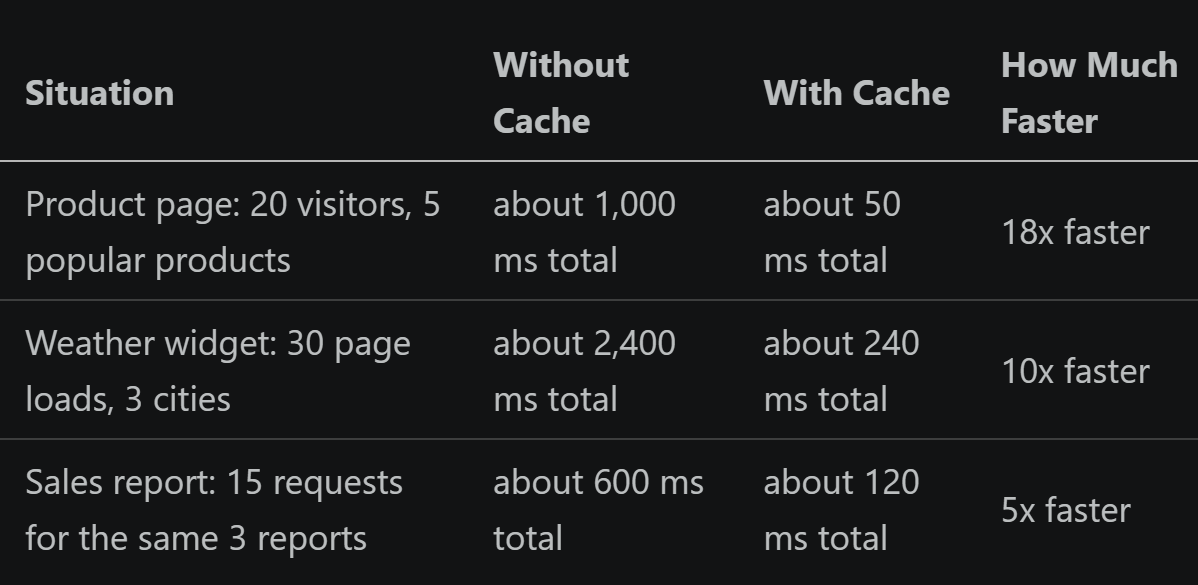
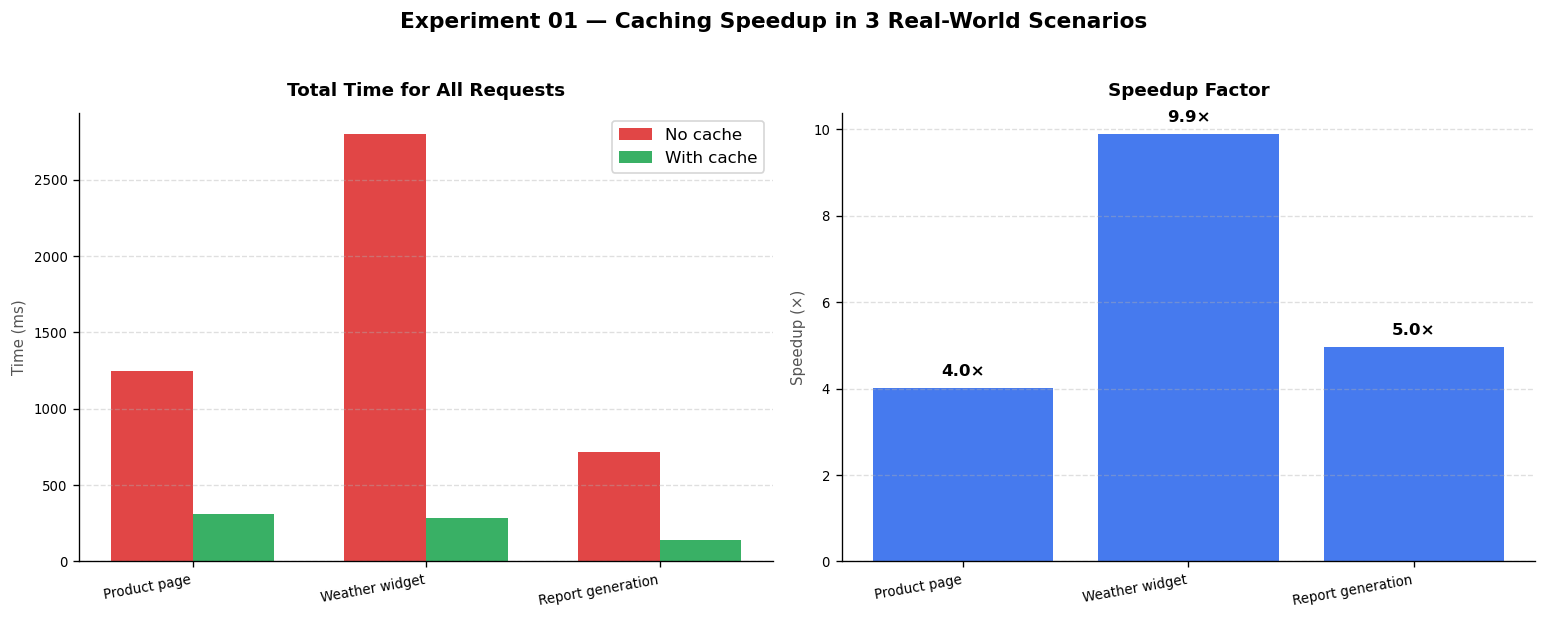
Experiment 01: Total time to serve all requests without a cache (red bars) versus with a cache (green bars), plus the speedup factor for each scenario.
Why the product page is 18x faster
Imagine an online store like ASOS or Flipkart. At any given second, hundreds of people are viewing the same 10 or 20 popular products. Without a cache, every single visit causes a round-trip to the database. If that takes 50 ms each, and you get 1,000 visits per minute to the same product, that is 1,000 database queries per minute for data that hasn’t changed at all.
With a cache, the first visitor triggers the database query. Everyone after that gets the saved result in under 1 ms. The database is barely touched. This is exactly how Amazon, Zalando, and every major e-commerce site handles product pages.
The money side of caching
Latency is not the only cost. Many external services charge per API call. Consider a weather widget on a news site. Say the weather API costs $0.001 per request. You have 1 million page loads per day, and the site covers 3 cities. Without a cache, that’s $1,000 per day, or $30,000 per month, just for weather data that updates every hour. With a cache that refreshes every 5 minutes, you make at most 864 API calls per day. Cost drops to under $1 per day. That’s a 99.9% saving with about 10 lines of code. Real company example: Twitter’s timeline cache When you open Twitter (now X), your home timeline is not assembled live from the database. It was pre-computed and cached when people you follow posted. Twitter’s engineering team has written about caching timelines for hundreds of millions of users. The alternative, rebuilding the timeline from scratch for every page load, would require thousands more servers.
What to Remember
A simple Python dictionary acting as a cache can make your app 5 to 18 times faster with almost no code
The more users request the same data, the bigger the benefit
Caching API calls can cut your monthly cloud bill by 99% or more
You do not need Redis or any special setup to start caching. A plain dictionary works fine for a single server
2 What Gets Deleted When the Cache Is Full?
A cache can’t hold everything forever. At some point it fills up, and something has to be removed to make room for new data. The rule that decides what gets deleted is called the removal policy. Choosing the wrong one for your situation can cut your cache’s effectiveness in half.
There are four common approaches:
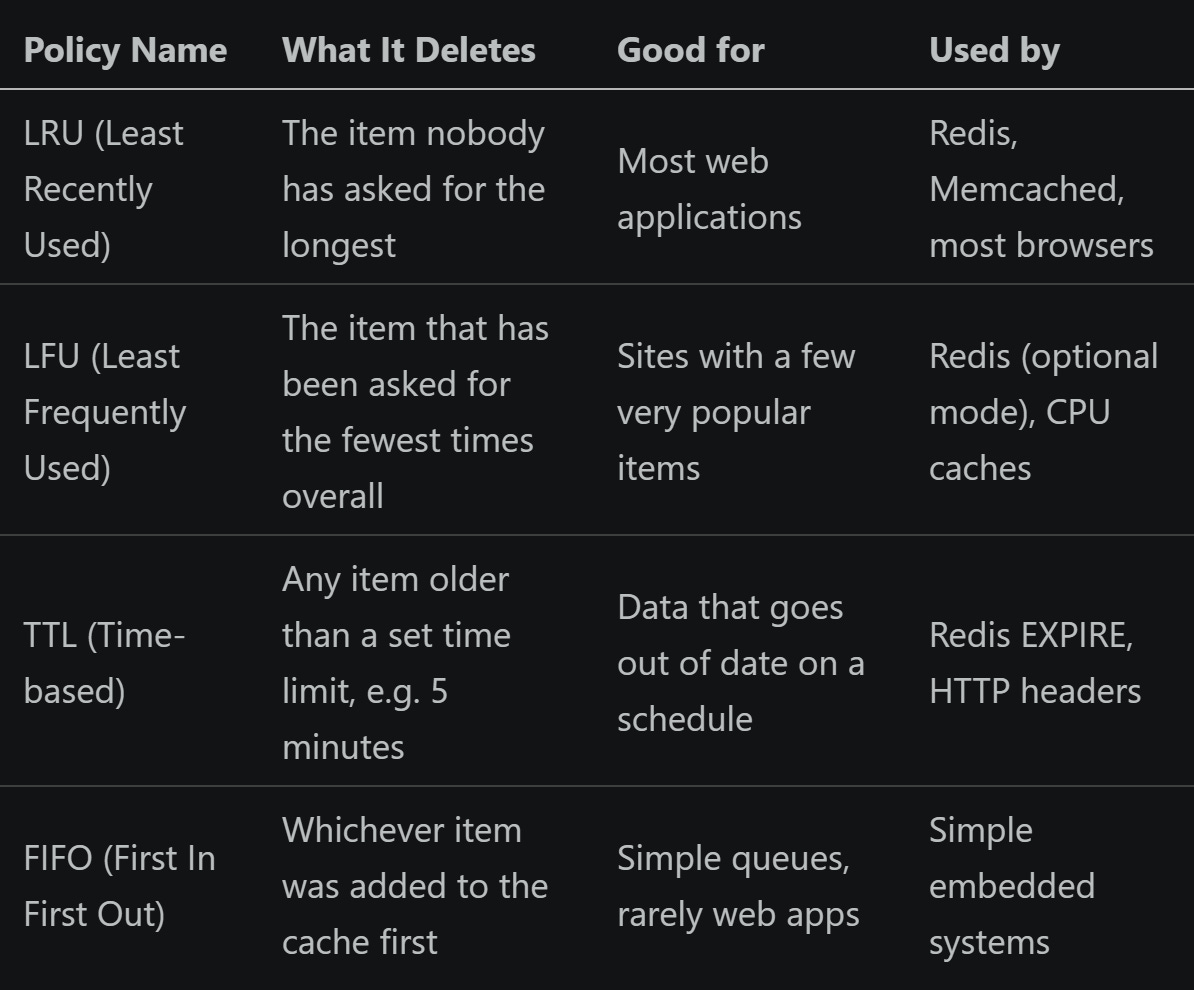
We ran all four against three different usage patterns to see which performs best in each scenario:
Most traffic goes to a few popular items (like the top 20 products on a shopping site, or the most-watched videos on Netflix)
All items accessed equally (a baseline, rarely seen in the real world)
80/20 split: 80% of requests hit only 20% of items (the classic real-world pattern)
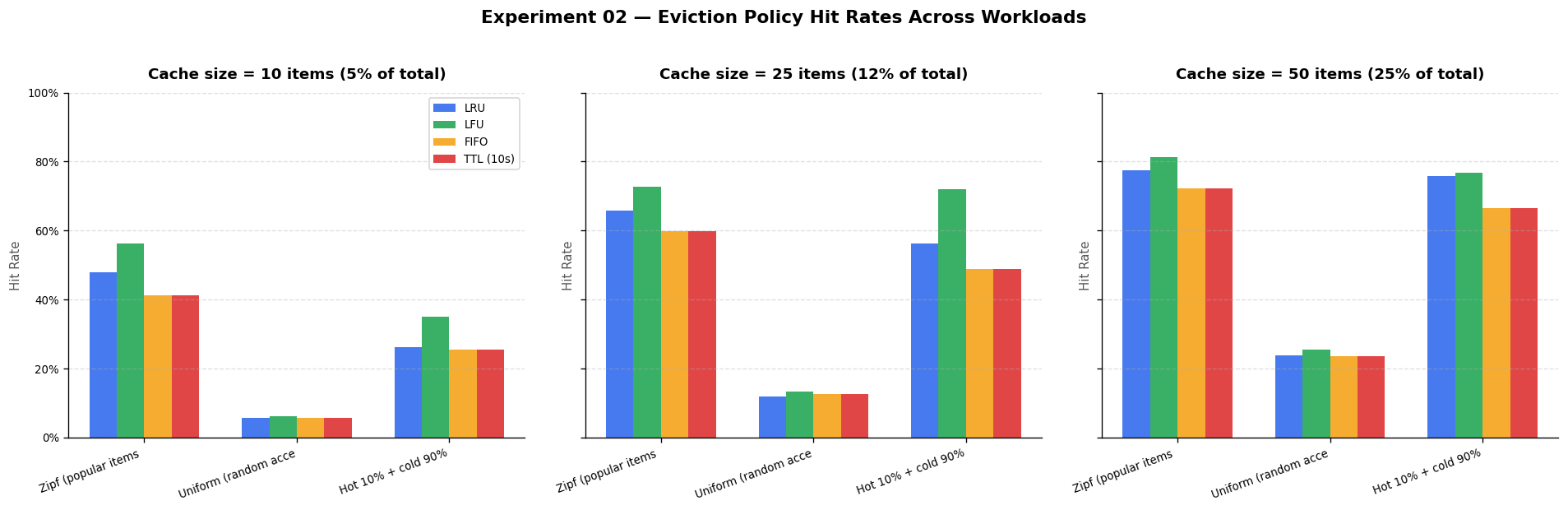
Experiment 02: How often each removal policy finds data in the cache (hit rate) across 3 usage patterns and 3 cache sizes. Higher is better.
What the results show
When most traffic goes to a small set of popular items (which is almost always the case on real sites), LFU wins. The reason is simple: LFU knows which items are genuinely popular based on how many times they’ve been requested, and it never removes them. LRU can be tricked into removing a popular item temporarily if a wave of requests for less-popular items comes in.
On uniformly random access, all policies do about the same. There’s no pattern to take advantage of, so the removal order doesn’t matter.
FIFO consistently performs worst across all tests because it completely ignores usage patterns. It removes whatever was added first, which might be your most-requested item. What to set in Redis If you use Redis as your cache server, you control this via a config setting. For e-commerce, social media, or any site where a small number of items get most of the traffic: set maxmemory-policy allkeys-lfu. For a general-purpose cache with no strong patterns: set allkeys-lru. The default setting (noeviction) just returns errors when the cache is full. Do not use it in production. Real company example: Netflix and YouTube Both Netflix and YouTube keep their most-watched content on edge servers close to users. They use frequency-based removal (LFU) because 80% of views go to the top 20% of titles. Keeping that top 20% in cache at all times is the entire strategy. Removing a blockbuster film from cache to make room for something nobody watches would be counterproductive.
What to Remember
If your site has popular items (products, articles, videos), use LFU. It keeps them cached longer
For general web apps, LRU is the safe and sensible default
Time-based removal (TTL) is essential for data that changes on a schedule: stock prices, weather, session tokens
Making the cache slightly larger often helps more than switching removal policies
3 Storing Things in Memory: Your Python Toolbox
Python gives you several built-in and library tools for in-memory caching. We tested five of them on the same workload: 500 requests to a product database where 80% of requests are for the same 4 popular products. The question: which tool is fastest and easiest to use? functools.lru_cache cachetools TTLCache cachetools LRUCache plain Python dict no cache at all
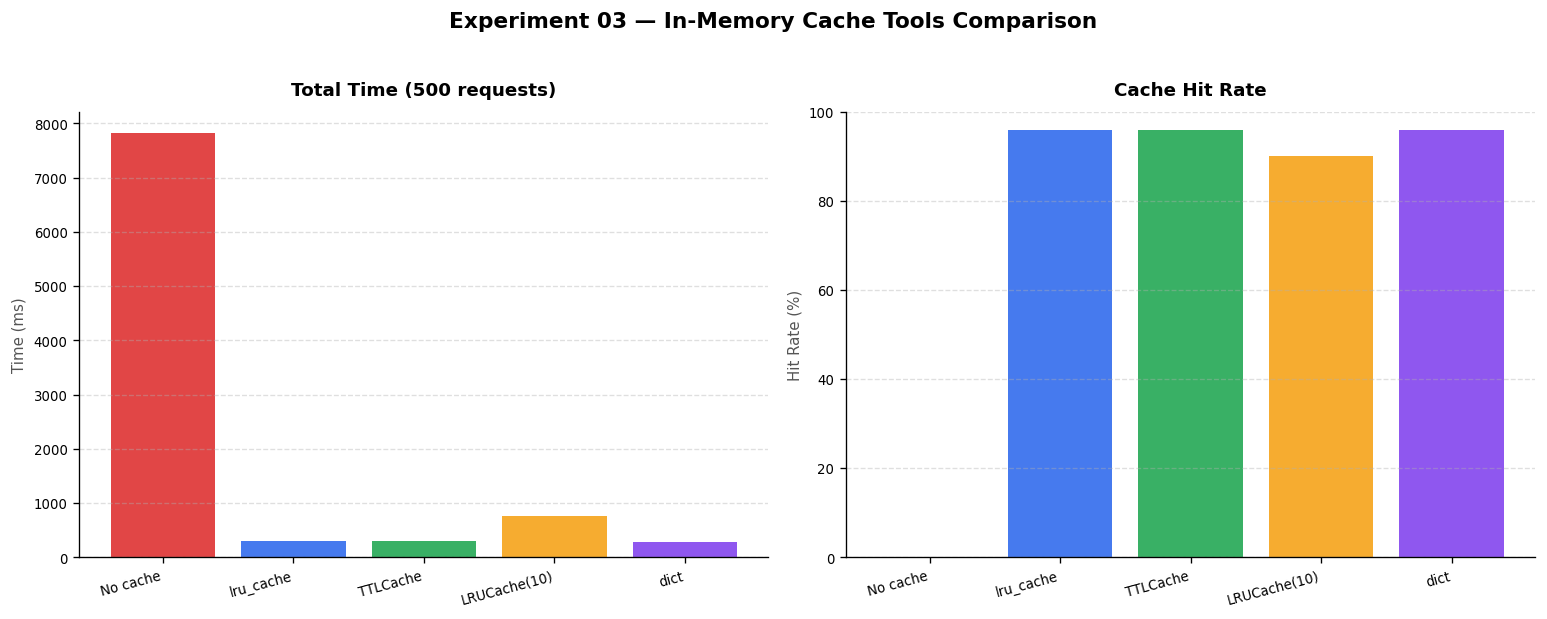
Experiment 03: Total time to handle 500 requests (lower is better) and cache hit rate (higher is better) for each Python caching tool.
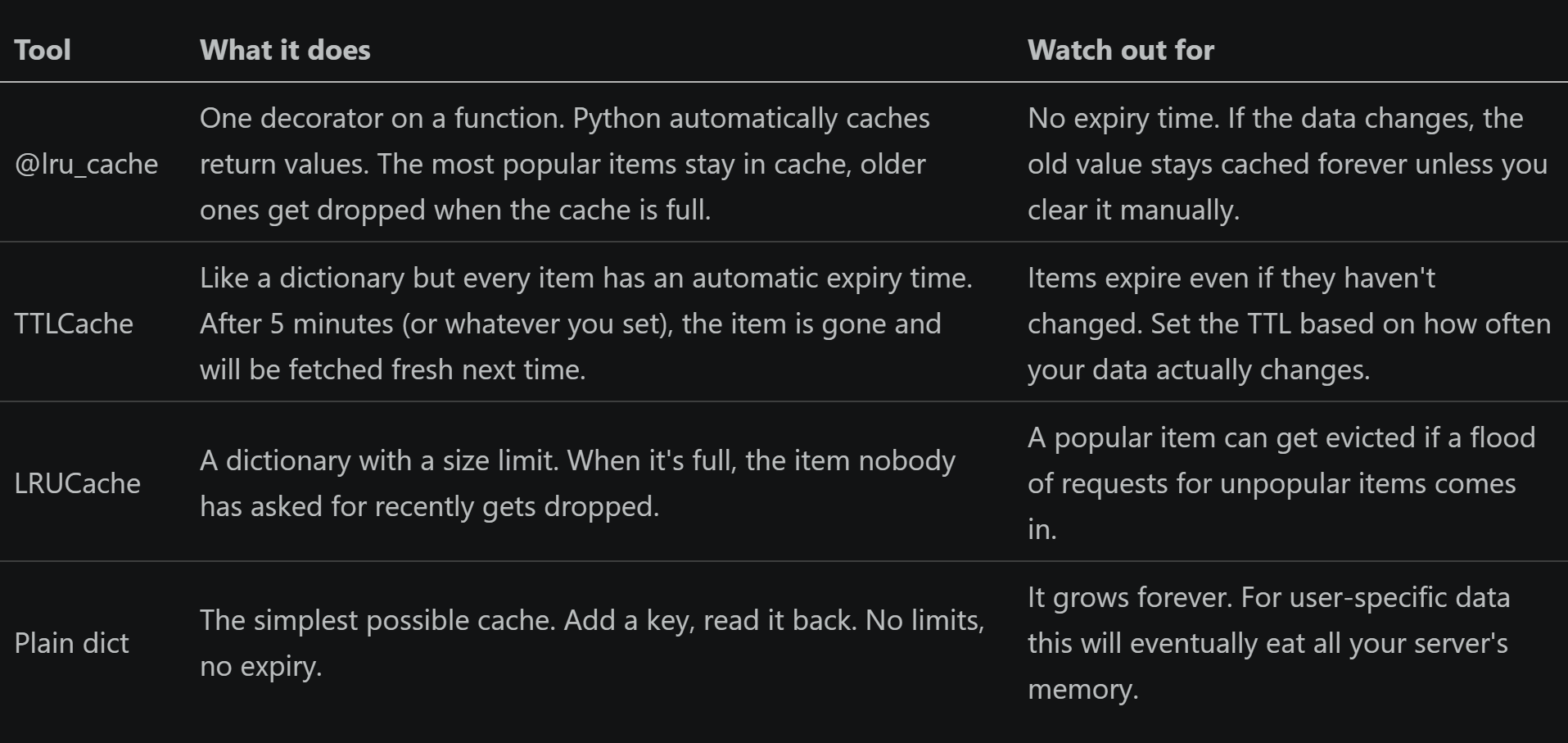
The tools explained simply
The one-line cache: lru_cache in action
The most common caching pattern in Python is so simple it barely looks like caching:
from functools import lru_cache

@lru_cache(maxsize=128)
def get_product(product_id):
    # This database call only runs once per product_id.
    # Every subsequent call with the same product_id returns instantly.
    return db.execute("SELECT * FROM products WHERE id = ?", (product_id,)).fetchone()
Shopify, Django, and Flask all use patterns like this internally for things like URL routing, template loading, and permission checks. The @lru_cache decorator works best for functions that always return the same output for the same input, like database lookups or computed values.
Adding an expiry time with TTLCache
For data that changes on a schedule, like product prices or stock levels, you want the cache to automatically expire entries:
from cachetools import TTLCache

# Cache holds up to 1,000 items. Each item expires after 5 minutes.
cache = TTLCache(maxsize=1000, ttl=300)

cache["product:42"] = {"name": "Running Shoes", "price": 89.99, "stock": 14}

# 6 minutes later, the above entry is automatically gone.
# The next request for product:42 will go to the database and refresh it.
result = cache.get("product:42")   # returns None, triggers a fresh fetch
When to use each tool Use @lru_cache when your function always returns the same result for the same input (currency conversions, product lookups by ID, config values).
Use TTLCache when data goes out of date (stock levels that update every minute, exchange rates, authentication tokens, weather).
Use a plain dict for data loaded once when your app starts and never changes (country code lists, language translations, settings from a config file).
What to Remember
Adding
@lru_cacheto a slow function takes 5 seconds and can make it 10 to 50 times fasterAlways set an expiry time on data that can change. An unbounded cache with stale data is worse than no cache
A plain dictionary cache grows forever. Fine for config data, dangerous for user-specific data
Aim for a cache hit rate above 80%. If you’re below 60%, your expiry time might be too short
4 Speeding Up Your Database
Database queries are the most common performance bottleneck in web applications. Query caching stores the result of a database query in memory. The next time that exact same query runs, it returns the saved result without touching the database at all.
We tested this on a 10,000-row product database with two types of queries:
Single-item lookup: fetch one product by its ID (1,000 requests for 50 unique products)
Summary report: calculate total sales per category (50 users open the same dashboard)
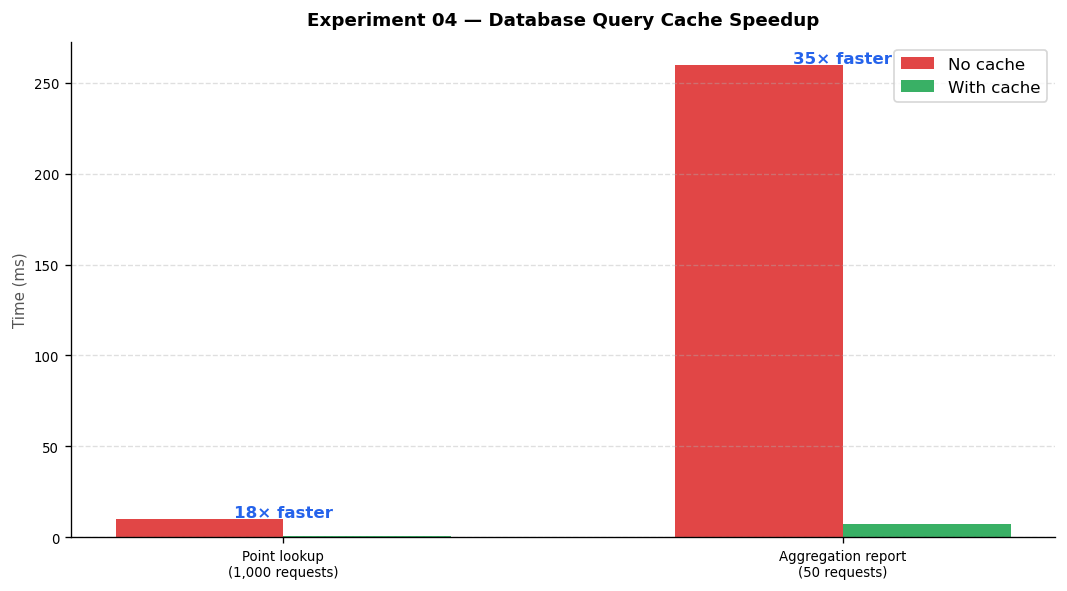
Experiment 04: Total time for all requests without a cache (red) versus with a cache (green). The summary report benefits most because the same expensive calculation runs once instead of 50 times.
How to build a simple query cache
The approach is straightforward. Before hitting the database, check if you already have the result saved. If yes, return it. If no, run the query, save the result, then return it.
import hashlib

query_cache = {}

def fetch_with_cache(sql, params, db_connection):
    # Turn the query and its values into a unique identifier (a short fingerprint)
    fingerprint = hashlib.sha256((sql + str(params)).encode()).hexdigest()[:16]

    if fingerprint not in query_cache:
        # Not in cache yet, ask the database
        query_cache[fingerprint] = db_connection.execute(sql, params).fetchall()

    return query_cache[fingerprint]
This pattern is used by virtually every major web framework. Django calls it the cache framework. Rails calls it the query cache. Hibernate does it automatically in Java. The concept is the same everywhere.
The trickiest part: keeping the cache up to date
Here is the scenario that breaks query caches: a product’s price changes in the database, but your cache still holds the old price. A customer sees “$9.99” on the product page. They click “Buy”. At checkout, the actual price is $29.99. The order fails. The customer is angry.
The fix is simple in principle: whenever you write new data to the database, also remove the relevant entries from the cache. This forces the next read to fetch fresh data.
def update_product_price(product_id, new_price, db_connection, cache):
    # Step 1: Update the database
    db_connection.execute("UPDATE products SET price = ? WHERE id = ?", (new_price, product_id))
    db_connection.commit()

    # Step 2: Remove the old cached version so the next read gets the new price
    stale_key = f"product:{product_id}"
    if stale_key in cache:
        del cache[stale_key]
Stale data causes real customer problems In 2022, several e-commerce sites faced issues where promotions had ended but cached pages still showed the old discount price. Customers would add items to their cart expecting the discount, then be surprised at checkout. The lesson: every time you write data, you must also clear the related cache entries. No exceptions for financial or inventory data. Real company example: Stack Overflow Stack Overflow serves millions of questions and answers to developers every day. Their engineering team has written about running on just a handful of servers because of aggressive caching. Question pages, user profiles, and tag pages are all cached. When someone posts an answer, the question’s cache entry is cleared and rebuilt. This combination of caching plus smart invalidation is why the site feels instant despite handling enormous traffic.
What to Remember
Single-item lookups get 10 to 50 times faster even with a basic in-memory cache
Summary reports and totals benefit most: the heavy calculation runs once, everyone else gets the saved result
The rule is simple: when you write data, clear the related cache entries immediately
Never cache financial data without an expiry time or a clear invalidation rule
5 HTTP Caching: Let the Web Do the Work
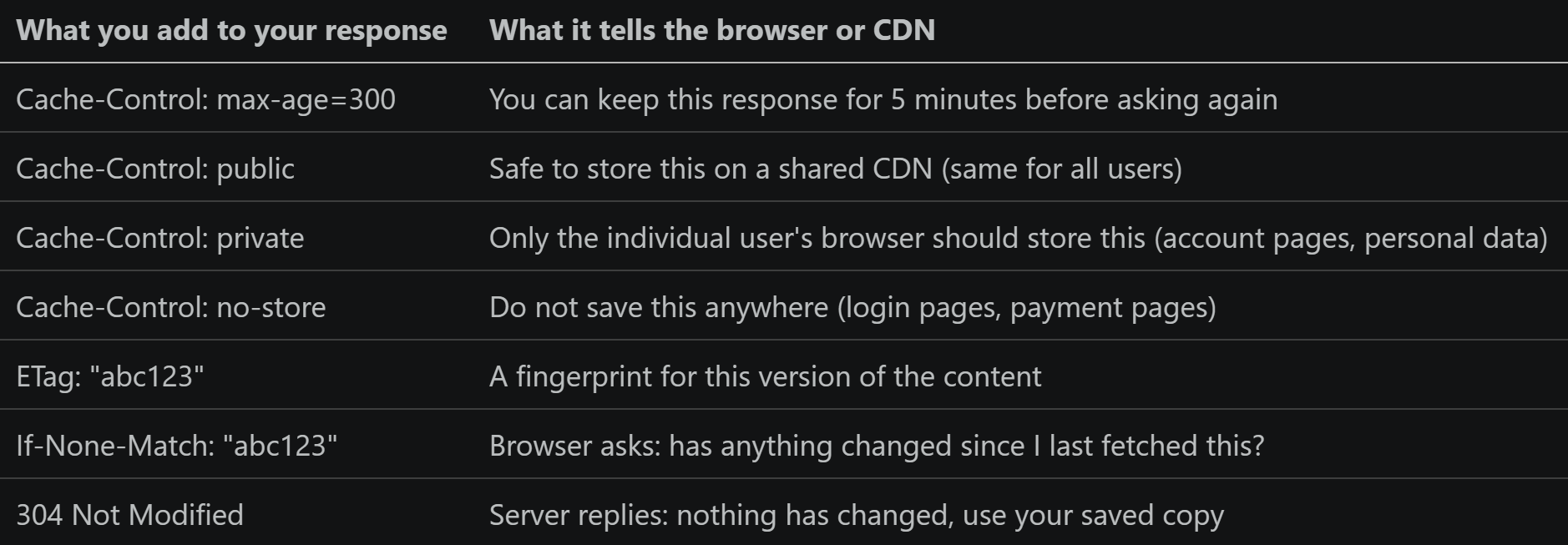
Here is something most developers don’t take full advantage of: the HTTP protocol, the language browsers and servers speak, has caching built right in. When you send the right instructions in your server’s response, browsers, CDN networks, and reverse proxies will cache your pages automatically. No extra code needed on the server side.
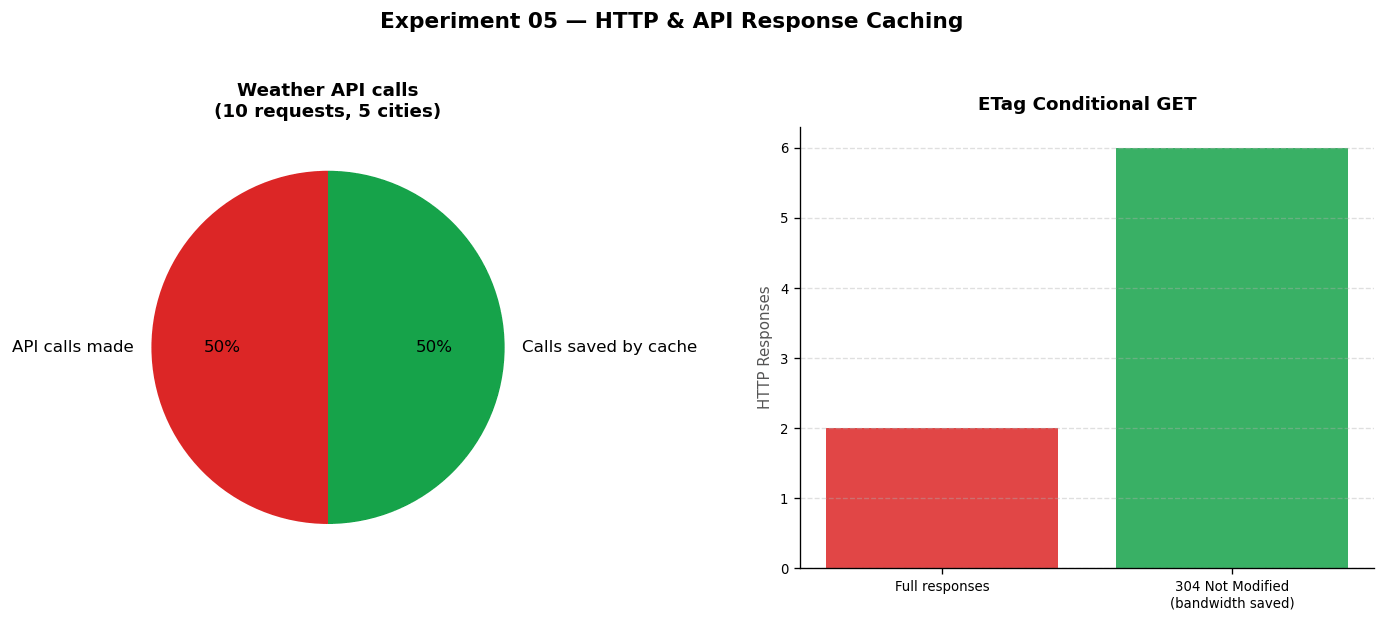
Experiment 05: Left chart shows roughly 70% of weather API calls avoided by a 5-minute cache. Right chart shows how ETags let the server skip sending data when nothing has changed.
ETags: the clever way to avoid re-sending unchanged data
Imagine a news website. A reader opens an article. You send them 50 KB of HTML. 30 seconds later they refresh the page. Has the article changed? Probably not. Without ETags, your server sends 50 KB again anyway. With ETags, the conversation goes like this:
Server sends the article plus a fingerprint:
ETag: "article-v42"Reader refreshes. Browser sends: “Give me the article, but only if it’s changed since I got version
article-v42“Article hasn’t changed. Server replies:
304 Not Modifiedwith an empty bodyBrowser uses its saved copy. No data transferred. Both sides win
GitHub’s entire API uses ETags. Every API response includes a fingerprint. Every well-behaved API client sends that fingerprint on the next request. AWS S3 puts an ETag on every object. This pattern cuts bandwidth costs significantly at scale.
# Example using FastAPI
from fastapi import Response, Header
import hashlib, json

@app.get("/products/{product_id}")
def get_product(product_id: int, if_none_match: str = Header(None)):
    product = db.fetch(product_id)

    # Create a fingerprint of this version of the product data
    fingerprint = hashlib.md5(json.dumps(product).encode()).hexdigest()[:8]

    # If the browser already has this version, save bandwidth
    if if_none_match == fingerprint:
        return Response(status_code=304)  # Nothing changed

    return Response(
        content=json.dumps(product),
        headers={
            "ETag": fingerprint,
            "Cache-Control": "public, max-age=60"
        }
    )
Caches that survive a server restart
Sometimes you need a cache that doesn’t disappear when your process stops or crashes. For example, a data pipeline that scrapes 10,000 web pages takes 3 hours. If it crashes halfway, you don’t want to re-download pages you already have. The diskcache library saves cache entries to disk so they survive restarts:
import diskcache

cache = diskcache.Cache("/tmp/pipeline_cache")

# Even if the script crashes and restarts, these values are still there
cache.set("exchange:USD:GBP", 0.79, expire=3600)
cache.set("weather:London", {"temp": 18, "rain": False}, expire=300)
Do not mark user-specific pages as public If you set Cache-Control: public on a page that contains a user’s personal information or order history, a CDN might serve that page to a different user. This has caused real data privacy incidents at several companies. Always use Cache-Control: private for pages that show any data specific to one user.
What to Remember
Add
Cache-Controlheaders to every response. Without them, browsers and CDNs guess and often get it wrongETags let you tell browsers “nothing has changed, use your copy” without re-sending the full page
For external API calls (weather, maps, prices): cache the result with a sensible expiry time
Use
diskcachefor pipeline state that needs to survive a crash or server restartNever cache a page with personal user data on a shared CDN
6 When You Write Data: Three Different Approaches
We’ve talked a lot about reading from caches. But what happens when you write new data? Do you update the cache first, the database first, or both at the same time? The answer depends on how critical it is that your data is always accurate.
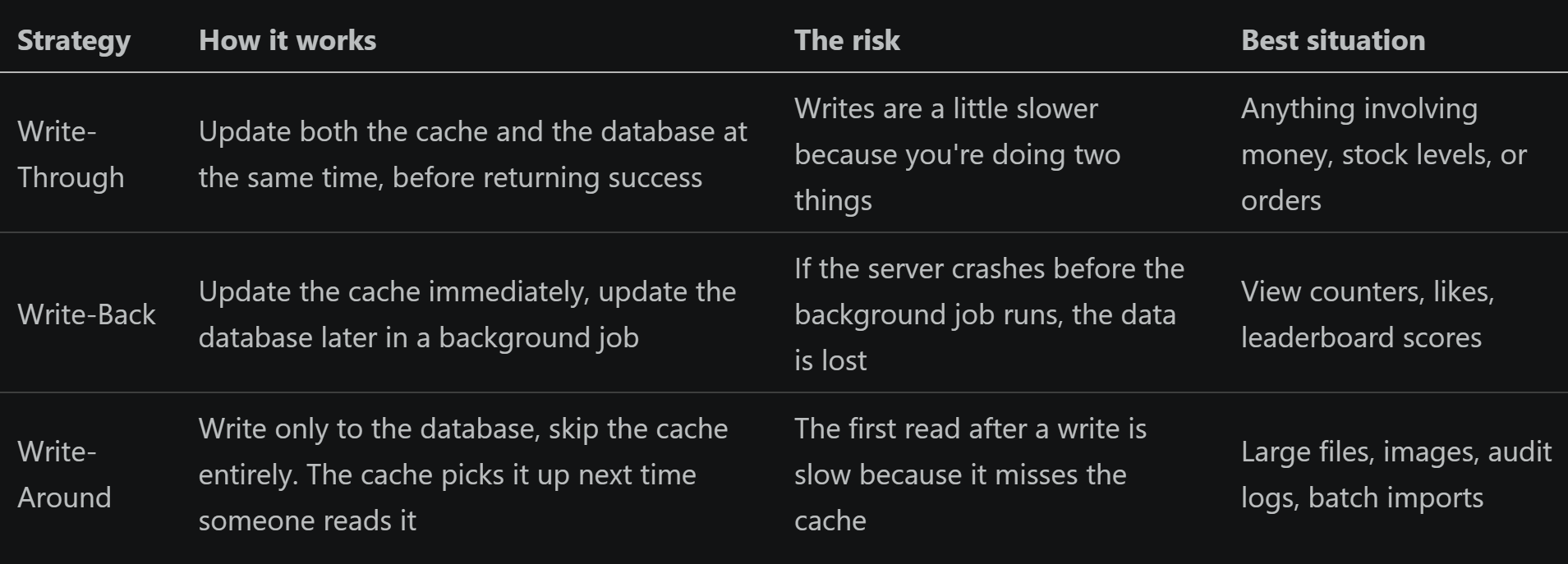
We tested all three on an inventory system with 200 mixed operations (about 160 reads, 40 writes).
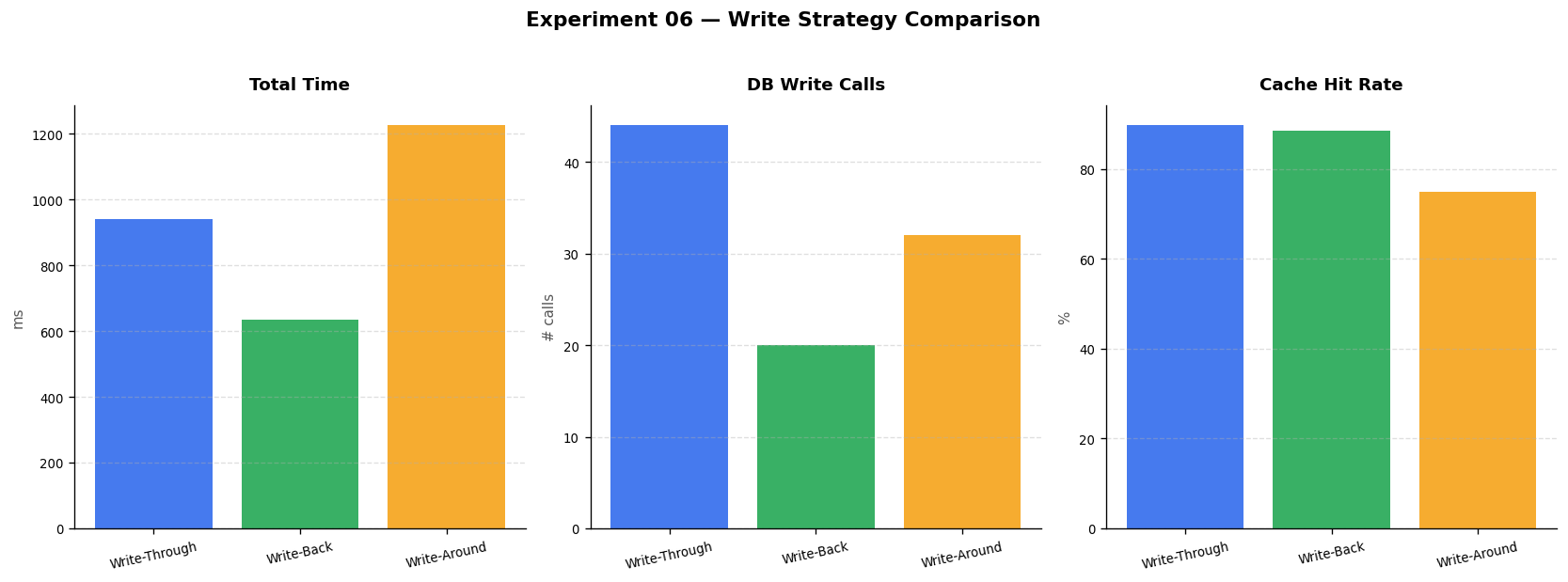
Experiment 06: Write-back is fastest overall but defers database writes. Write-through takes slightly longer per operation but keeps data safe. Write-around has a lower cache hit rate.
The danger of Write-Back: a story
Imagine a gaming leaderboard. A player scores 1 million points. Your app saves it to the cache immediately and plans to update the database in the next batch job 30 seconds later. 28 seconds later, the server crashes. The database still shows 0 points. The player’s achievement is gone. They are not happy.
This is the real risk of write-back caching. For something like a view counter on a YouTube video (off by 1,000 for 30 seconds is acceptable), it’s fine. For anything a user would notice or complain about (money, health data, game progress), it’s dangerous.
# Write-back: fast but risky
cache["player:5:score"] = 1_000_000   # Saved to cache only
# Server crashes here
# Database still says 0 points

# Write-through: safe
db.execute("UPDATE leaderboard SET score = 1000000 WHERE player_id = 5")
db.commit()
cache["player:5:score"] = 1_000_000   # Now both are updated
If you need both speed and safety, Redis (a popular caching server) has an option called “append-only file” (AOF) mode. Every write gets logged to disk before Redis says it succeeded. If Redis crashes, it replays the log when it restarts. This makes write-back much safer, which is why Redis is used for write-back caching at companies like Twitter and Instagram. How big companies choose write strategies Stripe (payments): Write-through. A payment must be recorded in the database before the user sees a success message. No shortcuts.
YouTube (view counts): Write-back. Your video going from 1,000,042 views to 1,000,043 views can wait a few seconds. Speed matters more than precision here.
Cloudflare CDN (website files): Write-around. When you upload a new version of your website, Cloudflare writes it to storage directly. The CDN edge servers pick up the new version on next request.
What to Remember
Default to write-through for any data users care about: orders, account info, prices, inventory
Write-back is safe for counters and scores where being briefly out of date is acceptable
Write-around is good for large files and bulk uploads where you don’t expect to read them back immediately
If using write-back with Redis, turn on AOF mode so data survives a crash
7 Smarter Caching for AI Chatbots
Regular caches match questions exactly. If someone asks “What is your return policy?” and you have that answer cached, great. But what if the next person asks “How do I return something?” That’s a different string of text, so a regular cache calls your AI model again and charges you again.
The problem is that people express the same question in dozens of different ways. A customer support chatbot might receive all of these in a single hour:
"What is your return policy?"          -- regular cache: MISS, costs $0.002
"How do I return an item?"             -- regular cache: MISS, costs $0.002
"Can I get a refund?"                  -- regular cache: MISS, costs $0.002
"I'd like to send something back"      -- regular cache: MISS, costs $0.002
"What's the process for returning?"    -- regular cache: MISS, costs $0.002
Five AI model calls. Five charges. But they all mean the same thing. A semantic cache understands this. It looks at the meaning of the question, not the exact words.
How semantic caching works
When a question comes in, a small, fast AI model converts it into a list of numbers (called an embedding or a vector) that represents its meaning. Think of it as a map coordinate for the idea behind the question. When you look up the cache, you’re asking: “Is there a cached answer whose meaning is close enough to this question?”
Question arrives: “How do I send something back?”
Convert it to a meaning-vector using a small, free embedding model
Compare that vector to every cached answer we have
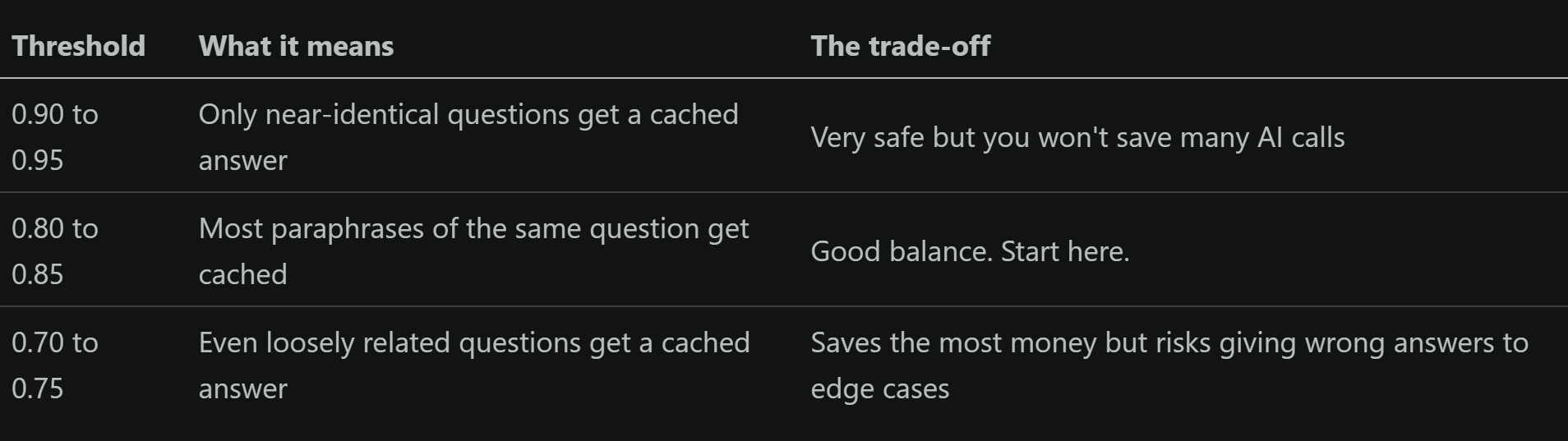
If the best match scores above 0.82 out of 1.0 (meaning the ideas are very close), return the cached answer
If nothing is close enough, ask the AI model, save the answer, move on
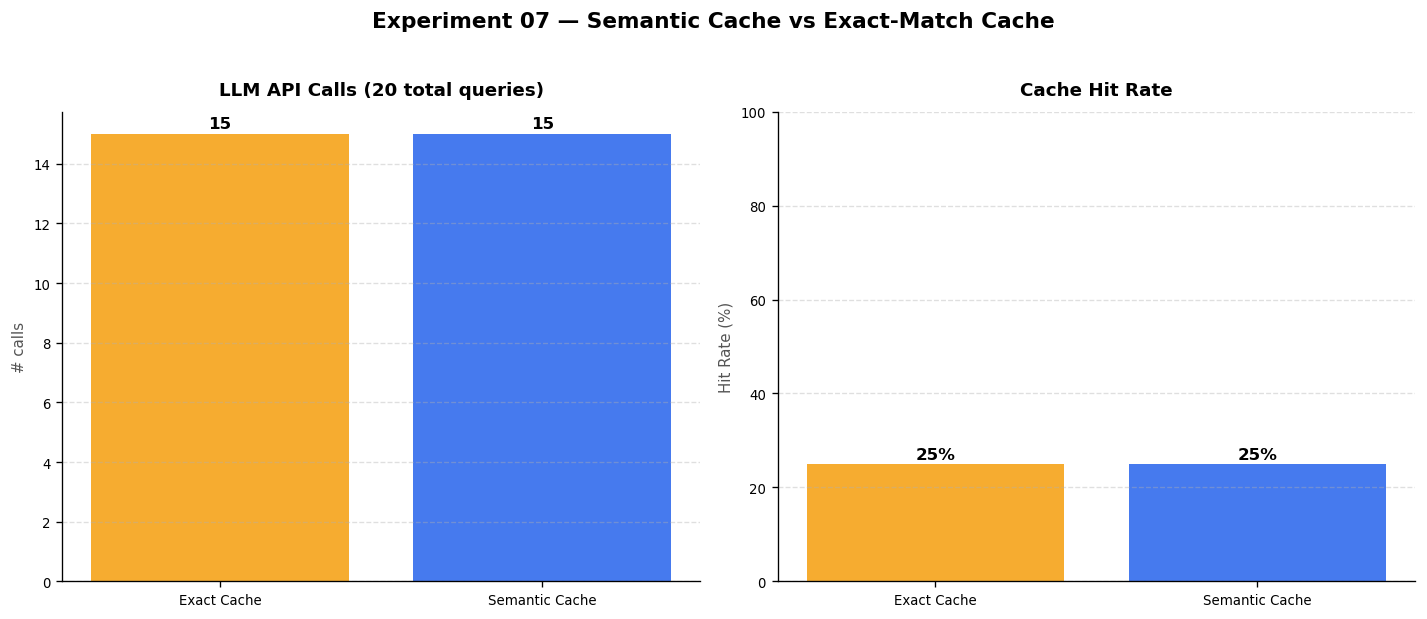
Experiment 07: Semantic cache (blue bars) versus exact-match cache (orange bars). The semantic cache catches paraphrased questions that the regular cache misses completely.
How similar is “similar enough”?
The similarity threshold (that 0.82 number) controls how aggressive the cache is. You set it once and tune it based on your results.
The cost savings at scale
Imagine a customer support chatbot handling 50,000 questions per day, using GPT-4o-mini at $0.002 per call
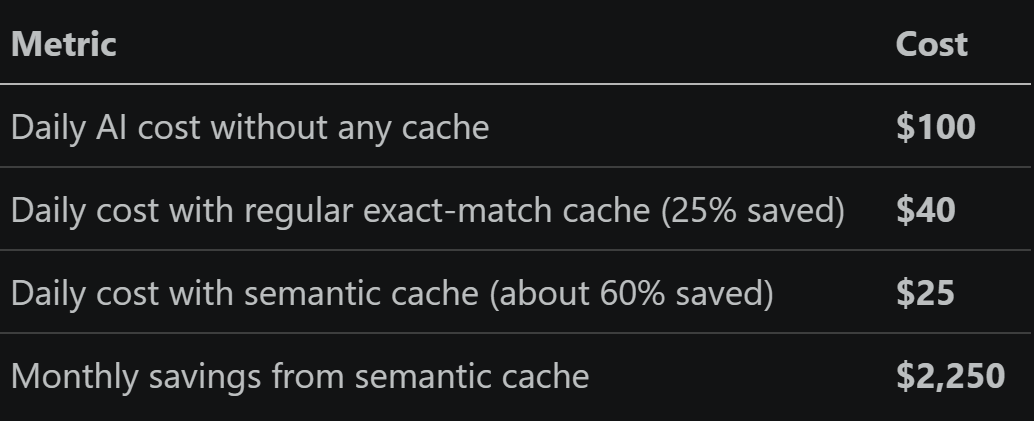
Real company example: Intercom and Zendesk AI Both Intercom and Zendesk have built AI-powered support chatbots that handle millions of customer questions per day. A significant part of their efficiency comes from recognising that support queues are full of the same questions phrased differently. Semantic caching (or similar intent-matching) means the AI model only has to answer each unique question once, no matter how many different customers ask it in different words. This is not just about saving money: it also makes responses faster because reading from a cache is nearly instant. Tools you can use today GPTCache: open-source, plugs directly into the OpenAI Python library.
Zep: designed for AI agents that need to remember past conversations.
Qdrant or Weaviate: vector databases that also work as semantic caches for large-scale applications.
What to Remember
Regular caches save money when people ask the exact same question. Semantic caches save money when people ask the same question in different words
The embedding model that converts questions to meaning-vectors is small, fast, and free. It costs far less than an AI model call
Start with a similarity threshold of 0.82. Raise it if you’re getting wrong answers, lower it if you want to save more
For a typical customer support or FAQ chatbot, you can expect to cut your AI model costs by 40 to 80 percent
8 The Big Picture: How Everything Fits Together
Here is the combined view from all 8 experiments: how well each caching approach worked, how much faster the system became, and what the numbers look like when you put them all on one chart.
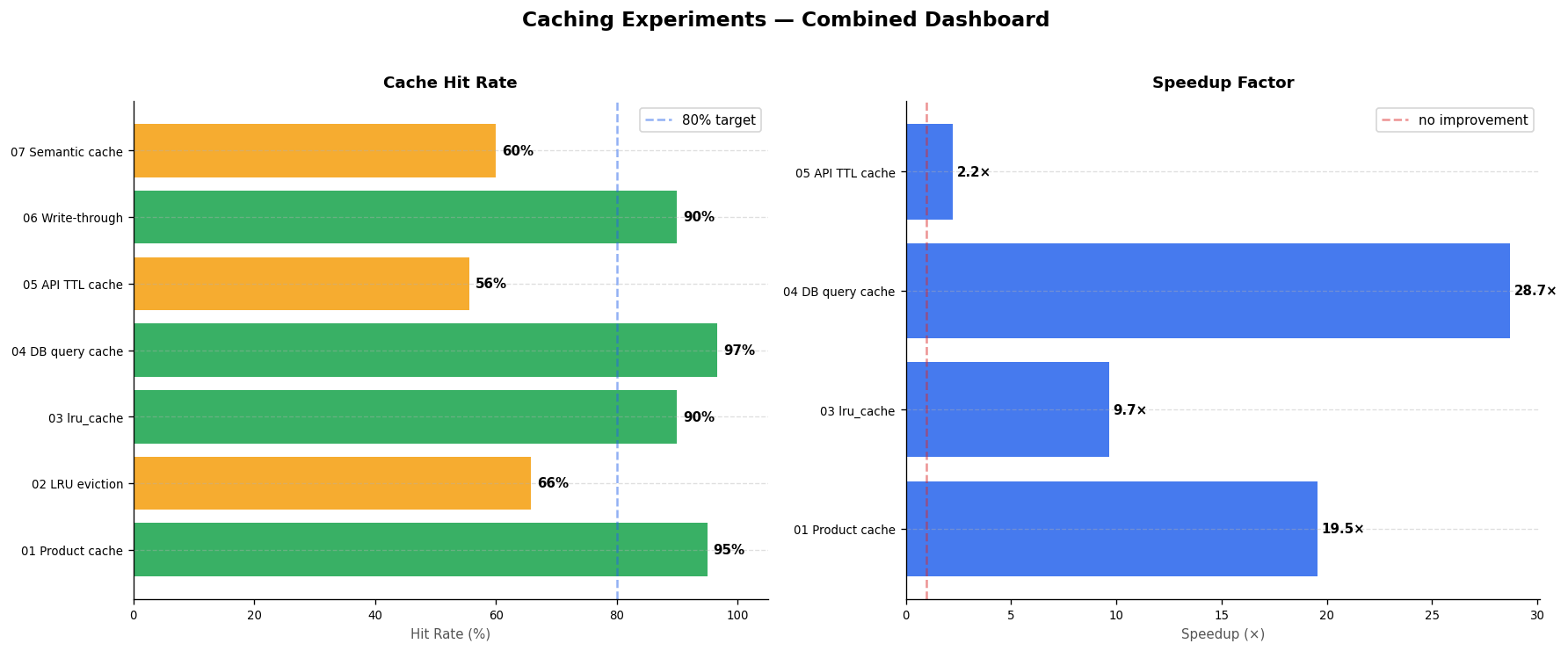
Experiment 08: Hit rates and speedup factors across all 8 experiments. Green means 70% or more of requests were served from cache. Yellow is 40 to 70%. Red is below 40%.
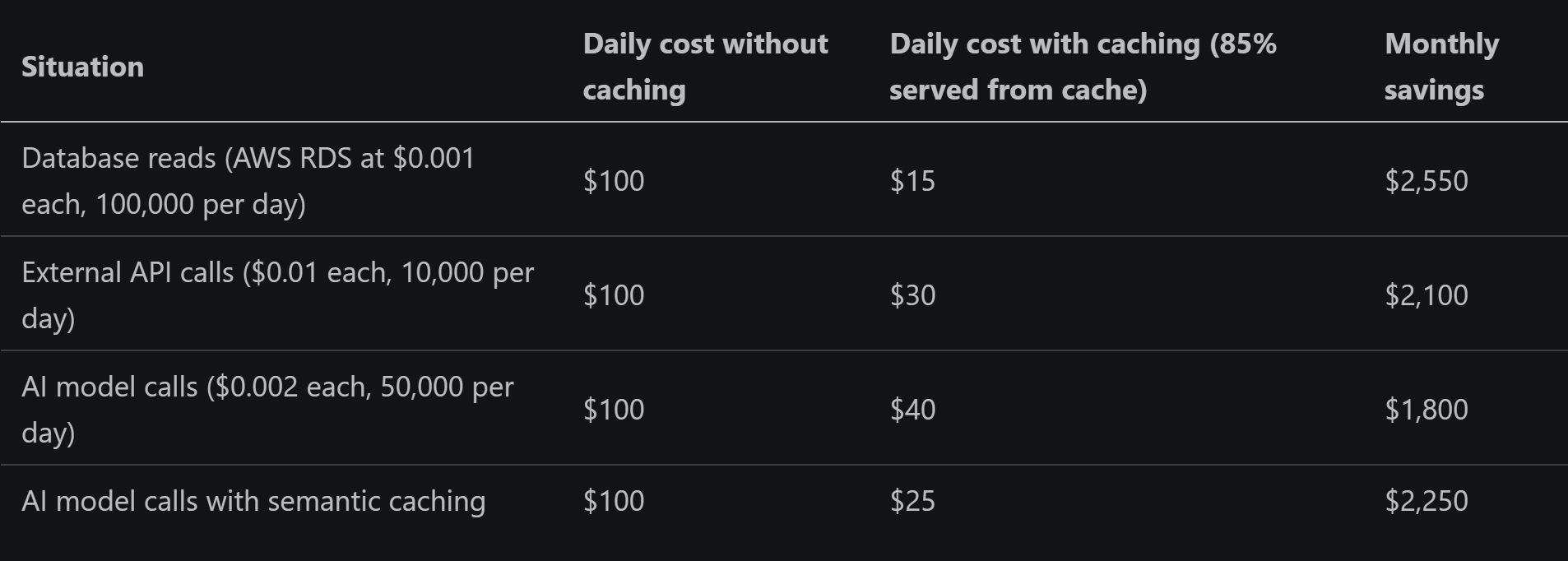
What it costs to not cache (at scale)
Three rules to live by
Rule 1: Measure before you cache Do not add a cache because it sounds like a good idea. Find out where your app is actually slow. Use profiling tools, look at slow query logs, check your API response times. Cache the specific thing that’s causing the bottleneck. Caching the wrong thing gives you complexity without benefit.
Rule 2: Plan for when data changes The hardest part of caching is not writing the cache code. It’s making sure the cached copy gets removed or updated when the original data changes. This is sometimes called “cache invalidation” and it’s the root cause of more bugs than almost anything else in web development. Before you cache anything, write down the answer to: “When this data changes, how will the cache know?”
Rule 3: Watch your hit rate like a health metric The “hit rate” is the percentage of requests that were served from cache rather than from the database or API. If your hit rate is below 60%, your cache is barely helping. Common causes: the expiry time is too short, the cache key includes something that changes on every request (like a timestamp), or the cache is too small. Check this number regularly. An 80% hit rate or higher is a healthy target.
Summary: What We Learned Across 8 Experiments
Experiment 1: A basic dictionary cache gives 5 to 18 times speedup with barely any code
Experiment 2: For sites with popular items, frequency-based removal (LFU) outperforms time-based (LRU) by 10 to 20 percentage points
Experiment 3: One decorator on a slow function is often the quickest win in Python
Experiment 4: Report and summary queries benefit most from caching. The heavy calculation runs once, everyone shares the result
Experiment 5: ETags eliminate bandwidth waste. diskcache survives crashes and restarts
Experiment 6: Use write-through for money and inventory. Write-back for counters and scores
Experiment 7: Semantic caching cuts AI model costs by 40 to 80 percent by recognising that people say the same thing in different ways
Experiment 8: At production scale, combining these techniques saves thousands of dollars a month
All experiments were run locally using Python 3.9, SQLite, scikit-learn, and matplotlib.
No cloud services, no paid APIs, no Docker. Just a laptop and a Python environment.